Pi Agent:安装、配置与安全使用
10 个章节
Pi Agent 安装、配置目录、常用命令、插件和安全使用说明。
Pi Coding Agent
概览
Pi 是运行在本机终端中的编码 Agent,默认提供 read、write、edit 和 bash 工具。Pi Web 是浏览器界面,与终端 Pi 共用配置、凭据和已保存会话,但不是同一个实时运行实例。
安装与目录
需要 Node.js 22.19.0 或更高版本:
node --version
npm install -g --ignore-scripts @earendil-works/pi-coding-agent
pi --version
在项目目录启动:
cd /path/to/project
pi
首次配置 Provider:
/login默认数据目录为 ~/.pi/agent/,可用 PI_CODING_AGENT_DIR 修改。
| 内容 | 位置 |
|---|---|
| 全局设置 | ~/.pi/agent/settings.json |
| 模型配置 | ~/.pi/agent/models.json |
| 凭据 | ~/.pi/agent/auth.json |
| 会话 | ~/.pi/agent/sessions/ |
| 已安装包 | ~/.pi/agent/npm/、~/.pi/agent/git/ |
| 项目信任 | ~/.pi/agent/trust.json |
常用操作
| 命令 | 用途 |
|---|---|
/model | 选择模型。 |
/login | 登录或配置 Provider。 |
/resume | 恢复历史会话。 |
/new | 新建会话。 |
/session | 查看会话信息。 |
/compact | 压缩上下文。 |
/reload | 重载配置、Extensions、Skills 和 Themes。 |
/quit | 退出 Pi。 |
| 常用启动方式: |
pi -c
pi -r
pi -p "总结这个仓库"
pi --mode json "检查测试失败原因"
pi --tools read,grep,find,ls -p "只读审查这个项目"
输入 @ 可引用项目文件;!command 会把命令输出发送给模型,!!command 不会发送。任务运行时,Enter 发送 steering 消息,Alt+Enter 发送 follow-up 消息。
Pi Web
全局安装和启动:
npm install -g @agegr/pi-web@latest
pi-web
默认地址为 http://127.0.0.1:30141。常用参数:
pi-web --port 8080
pi-web --no-open
检查服务:
curl -I http://127.0.0.1:30141
lsof -nP -iTCP:30141 -sTCP:LISTEN
tail -100 ~/.pi/agent/pi-web.log
Pi Web 可以浏览、恢复、分支、导出会话,查看项目文件和 Git diff,也可以管理模型与插件。不要从终端 Pi 和 Pi Web 同时向同一会话发送任务。
默认只监听 127.0.0.1。如需远程访问,使用可信 VPN,或通过 HTTPS 和认证反向代理;不要直接把可执行命令和读写文件的 Agent 暴露到互联网。
Pi Packages 与插件
已安装插件
共 10 个,均安装在 ~/.pi/agent/npm/node_modules/ 下:
| 插件 | 简介 |
|---|---|
@benvargas/pi-openai-fast | OpenAI 快速模式开关,为支持的 GPT-5 系列模型启用优先服务层级。 |
@narumitw/pi-statusline | 替换 Pi 底部状态栏,集中显示模型、工作区和运行状态等信息。 |
pi-tool-display | 优化工具调用展示,支持紧凑渲染、Diff 可视化,以及输出隐藏、折叠和截断。 |
@cortexkit/pi-magic-context | 提供跨会话记忆和上下文管理能力。 |
pi-web-access | 为 Pi 增加网页搜索、URL 抓取、GitHub 仓库读取、PDF 提取和视频分析等能力。 |
@gotgenes/pi-subagents | 提供进程内 Subagent 核心,用于运行自主子 Agent,并供其他扩展调用。 |
pi-open-tui | 美化终端界面,提供动画 Logo、信息化底栏、圆角编辑框和模型元数据展示。 |
pi-simplify | 检查最近修改的代码,帮助改进清晰度、一致性和可维护性。 |
pi-workspace-history | 为工作区提供撤销、重做、回滚和 /rewind 式历史恢复能力。 |
pi-sub2api-provider | 自动注册 sub2api/OpenAI 兼容 Provider,动态发现模型并通过 /quota 查询用量。 |
| Pi Web 是独立的 Web 应用,不属于 Pi 插件。 | |
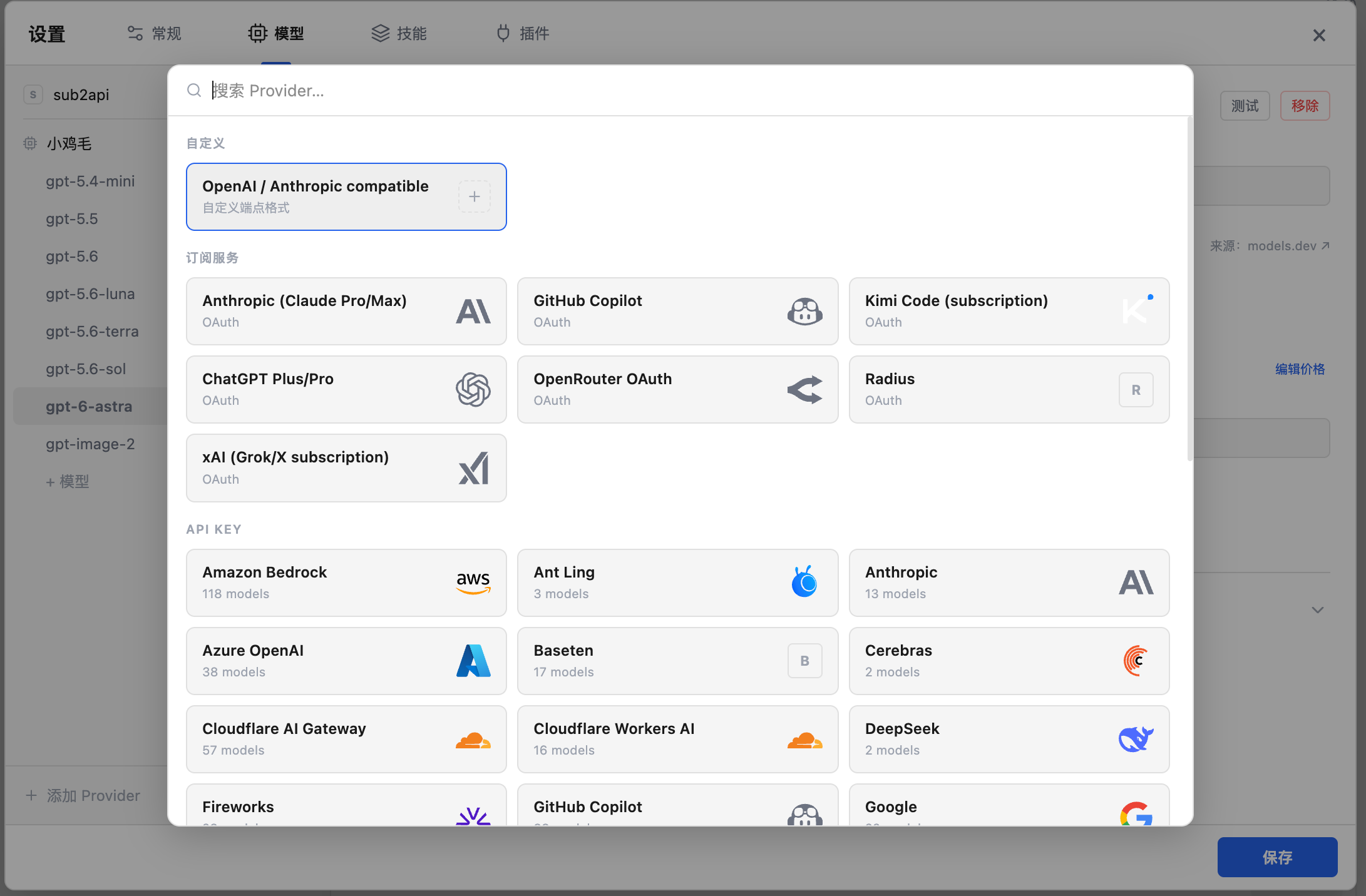
| 模型插件不太好用,我们可以在pi-web上进行配置 | |
| 选择添加provider后自定义端点格式写入地址和apikey 获取模型列表导入 | |
 |
也可以直接编辑.pi/agnet/下的配置文件 setting.json
{
  "lastChangelogVersion": "0.84.2",
  "theme": "dark",
  "defaultProvider": "sub2api",
  "defaultModel": "gpt-5.6-luna",
  "defaultThinkingLevel": "max",
  "packages": [
    "npm:@benvargas/pi-openai-fast",
    "npm:@narumitw/pi-statusline",
    "npm:pi-tool-display",
    "npm:@cortexkit/pi-magic-context",
    "npm:pi-web-access",
    "npm:@gotgenes/pi-subagents",
    "npm:pi-open-tui",
    "npm:pi-simplify",
    "npm:pi-workspace-history"
  ]
}
model.json
{
  "providers": {
    "sub2api": {
      "authHeader": true,
      "baseUrl": "https://sub.xxxxx.xyz/v1",
      "api": "openai-responses",
      "apiKey": "sk-xxxxx",
      "models": [
        { "id": "gpt-5.4-mini", "name": "GPT-5.4 Mini", "reasoning": true, "input": ["text", "image"], "contextWindow": 400000, "maxTokens": 128000, "thinkingLevelMap": { "off": null, "minimal": null, "low": "low", "medium": "medium", "high": "high", "xhigh": "xhigh", "max": null } },
        { "id": "gpt-5.5", "name": "GPT-5.5", "reasoning": true, "input": ["text", "image"], "contextWindow": 1050000, "maxTokens": 128000, "thinkingLevelMap": { "off": null, "minimal": null, "low": "low", "medium": "medium", "high": "high", "xhigh": "xhigh", "max": null } },
        { "id": "gpt-5.6", "name": "GPT-5.6", "reasoning": true, "input": ["text", "image"], "contextWindow": 1050000, "maxTokens": 128000, "thinkingLevelMap": { "off": null, "minimal": null, "low": "low", "medium": "medium", "high": "high", "xhigh": "xhigh", "max": "max" } },
        { "id": "gpt-5.6-luna", "name": "GPT-5.6 Luna", "reasoning": true, "input": ["text", "image"], "contextWindow": 1050000, "maxTokens": 128000, "thinkingLevelMap": { "off": null, "minimal": null, "low": "low", "medium": "medium", "high": "high", "xhigh": "xhigh", "max": "max" } },
        { "id": "gpt-5.6-terra", "name": "GPT-5.6 Terra", "reasoning": true, "input": ["text", "image"], "contextWindow": 1050000, "maxTokens": 128000, "thinkingLevelMap": { "off": null, "minimal": null, "low": "low", "medium": "medium", "high": "high", "xhigh": "xhigh", "max": "max" } },
        { "id": "gpt-5.6-sol", "name": "GPT-5.6 Sol", "reasoning": true, "input": ["text", "image"], "contextWindow": 1050000, "maxTokens": 128000, "thinkingLevelMap": { "off": null, "minimal": null, "low": "low", "medium": "medium", "high": "high", "xhigh": "xhigh", "max": "max" } },
        { "id": "gpt-6-astra", "name": "GPT-6 Astra", "reasoning": true, "input": ["text"], "thinkingLevelMap": { "off": null, "minimal": null, "low": null, "medium": null, "high": null, "xhigh": "xhigh", "max": "max" } },
        { "id": "gpt-image-2", "name": "GPT Image 2", "reasoning": false, "input": ["text", "image"] }
      ]
    }
  }
}
管理命令
第三方 Package 可能执行任意本机代码,安装前应检查来源:
pi list
pi install npm:<包名>
pi install -l npm:<包名>
pi update npm:<包名>
pi update --extensions
pi remove npm:<包名>
安装或更新后执行:
/reload安全与日常检查
Pi 没有内置沙箱,Pi 和 Extensions 使用启动用户的本机权限。项目信任只控制项目级设置和扩展是否加载,不是运行时隔离。
- 不可信仓库或无人值守任务使用容器、虚拟机或其他操作系统级沙箱。
- 任务开始前确认模型、思考级别和启用工具。
- 检查 Agent 执行的命令、文件改动和 Git diff。
- 修改代码后运行项目已有的测试、类型检查或 Lint。
- 凭据只保存在
auth.json或环境变量中。